Sim Racing Pedal Calibrations: Cut Lap Times by 0.8 Seconds
Optimizing sim racing pedal calibrations, particularly with load cell brake pressure profiles, can dramatically improve your lap times by up to 0.8 seconds by enhancing consistency and control.
Are you looking to unlock an edge in your virtual races? Mastering sim racing pedal calibration, particularly with load cell brake pressure profiles, stands as one of the most impactful adjustments you can make to shave crucial tenths off your lap times. This often-overlooked aspect of sim racing can be the difference between a podium finish and falling short.
Understanding the Importance of Load Cell Brakes
Load cell brakes represent a significant leap forward from traditional potentiometer-based pedal systems. Instead of measuring pedal travel, load cells measure the actual force applied to the pedal, providing a much more realistic and consistent braking experience. This fundamental difference is key to achieving greater precision and reducing lap times in sim racing.
The transition to a load cell system can feel daunting initially, but the benefits in terms of muscle memory development and brake modulation are undeniable. Potentiometer pedals often suffer from linearity issues and wear, leading to inconsistent braking points. Load cells, by contrast, offer a direct relationship between physical effort and braking force, mirroring real-world racing dynamics more closely.
The Mechanics of Load Cell Technology
Load cells work by converting mechanical force into an electrical signal. As you press the brake pedal, the load cell deforms slightly, and this deformation is measured and translated into a proportional output. This allows for incredibly fine control over braking force, which is critical for trail braking and managing tire lock-up. Understanding this mechanism is the first step towards effective calibration.
- Force Measurement: Directly measures pedal pressure, not position.
- Enhanced Consistency: Provides repeatable braking inputs based on muscle memory.
- Durability: Generally more robust and less prone to wear than potentiometers.
- Finer Control: Allows for precise modulation of brake force, crucial for advanced techniques.
Ultimately, the objective is to create a seamless connection between your physical input and the car's behavior in the simulator. A well-calibrated load cell brake enables you to brake later, more consistently, and with greater confidence, directly translating to faster lap times. This foundational understanding sets the stage for optimizing your pedal settings.
Initial Setup and Hardware Considerations
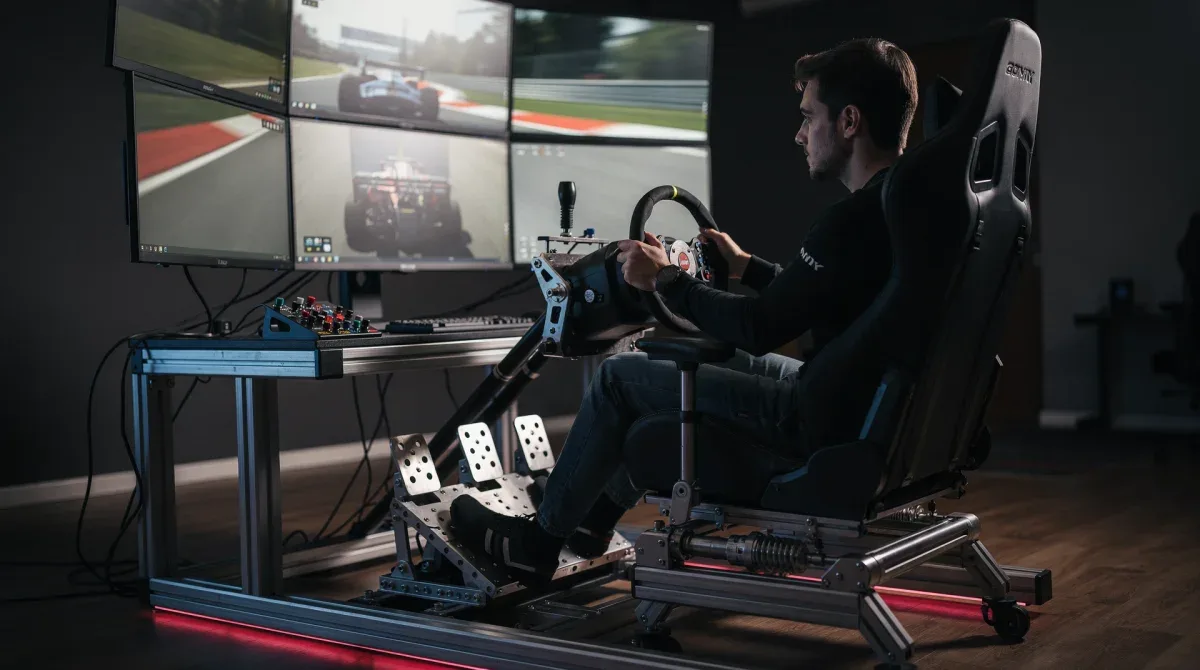
Before diving into specific calibration settings, a proper physical setup of your load cell pedals is paramount. This involves ensuring the pedals are securely mounted, that you have comfortable access, and that any included elastomers or springs are configured to your preference. The tactile feel of the pedal is just as important as the electronic calibration.

Many high-end load cell pedals come with adjustable elastomer kits, allowing you to fine-tune the stiffness and travel of the brake pedal. Experimenting with these options can significantly impact your braking feel and consistency. A pedal that is too soft might lead to over-braking, while one that is too stiff could make subtle modulation difficult. Finding the right balance is a personal journey.
Mounting and Ergonomics
Your pedal set must be firmly mounted to prevent any movement during intense braking. Flexing or shifting pedals can introduce inconsistencies, negating the benefits of load cell technology. Consider a solid rig or a dedicated pedal plate for optimal stability.
- Secure Mounting: Prevents pedal movement under heavy braking.
- Adjustable Position: Allows for comfortable foot placement and angle.
- Pedal Spacing: Optimize for heel-toe shifting or left-foot braking techniques.
Ergonomics play a crucial role in long-term performance and comfort. Ensure your seating position allows for full and consistent pedal depression without straining your leg or ankle. A poorly adjusted seating position can lead to fatigue and inconsistent braking, undermining all your calibration efforts. Take the time to dial in your physical setup before touching any software settings.
Calibrating Brake Pressure Profiles for Precision
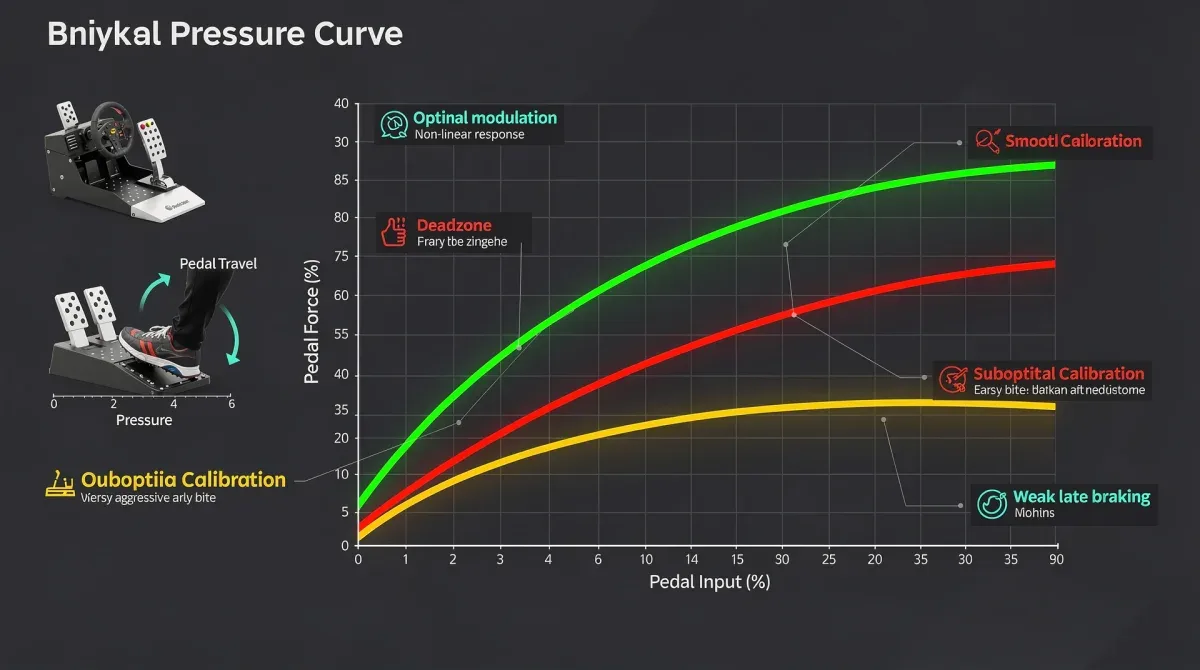
The core of improving your lap times through pedals lies in meticulously calibrating the brake pressure profile. This involves defining the minimum and maximum force required to register braking input, and critically, establishing a non-linear curve if desired. Most sim racing titles and pedal drivers offer robust calibration tools to achieve this.
A common mistake is setting the maximum brake force too low, meaning you're locking up tires before applying full physical effort. Conversely, setting it too high might mean you never reach 100% braking in-game. The goal is to match your physical maximum effort to the in-game 100% brake application, ensuring you utilize the full range of your pedal and the car's braking capabilities.
Defining Minimum and Maximum Values
Start by identifying the minimum and maximum force you can comfortably and consistently apply to your brake pedal. For the minimum, apply a very light touch to ensure no ghost inputs. For the maximum, press as hard as you can without discomfort, replicating emergency braking scenarios. These points define the full operational range of your pedal.
- Minimum Input: Set just above residual noise to prevent unwanted braking.
- Maximum Input: Correlate with your comfortable maximum physical effort for 100% in-game braking.
- Consistency Check: Repeat maximum pressure several times to confirm repeatability.
Once these endpoints are established, test them in-game. Drive a few laps, focusing solely on braking. Are you consistently hitting 100% braking when needed? Are you locking up too easily? Adjusting these minimum and maximum values is an iterative process that requires patience and careful observation. Small adjustments can yield significant improvements in your braking consistency.
Fine-Tuning Brake Curves for Optimal Feel
Beyond the simple minimum and maximum, many advanced pedal drivers and sim racing titles allow for the customization of brake curves. This feature is where you can truly tailor the pedal's response to your driving style and the specific car you're driving. A linear curve might not always be the fastest or most comfortable option.
A non-linear curve can, for example, make the initial part of the pedal travel less sensitive, allowing for more precise trail braking without immediate lock-up. Conversely, it can ramp up sensitivity towards the end of the travel, giving you finer control over maximum braking force. Experimentation here is crucial to finding what works best for you.
Exploring Non-Linearity
Non-linear curves introduce a different feel to the brake pedal. Some drivers prefer a more progressive curve, where the initial pedal travel has less effect, allowing for smoother modulation into the braking zone. Others might prefer a more aggressive curve that quickly reaches high braking force, favoring quick, decisive inputs.
- Progressive Curve: Softer initial response, easier for trail braking.
- Aggressive Curve: Quicker ramp-up to maximum braking, suited for hard, late braking.
- Custom Points: Some software allows for multiple custom points along the curve for granular control.
The ideal brake curve is highly subjective and depends on your driving technique, the car's characteristics, and even the track layout. A car with sensitive brakes might benefit from a progressive curve, while a car requiring heavy braking could use a more linear or aggressive one. Don't be afraid to experiment and save different profiles for various scenarios.
Advanced Techniques: Trail Braking and Lock-Up Prevention
With your load cell brake properly calibrated, you can now focus on advanced braking techniques that truly differentiate fast drivers from the rest. Trail braking and preventing wheel lock-up are critical skills that become significantly more accessible and consistent with a well-tuned load cell pedal. The precision offered by load cells allows for subtle adjustments mid-corner.
Trail braking involves gradually releasing the brake pedal as you turn into a corner, using the remaining braking force to help rotate the car. This technique requires exquisite control over brake pressure, something that potentiometer pedals often struggle to deliver consistently. Load cells provide the granular feedback needed to master this complex maneuver.
Mastering Trail Braking
To effectively trail brake, you need a brake pedal that responds predictably to minute changes in pressure. Your load cell calibration should provide a smooth, consistent gradient from maximum braking down to zero. Practice slowly releasing the pedal while turning, feeling how the car's balance shifts and how the tires maintain grip.
- Smooth Release: Gradually reduce pressure as you enter the turn.
- Balance Transfer: Use braking to shift weight and aid car rotation.
- Tyre Feedback: Pay attention to the audio and force feedback cues for grip limits.
Preventing wheel lock-up is another area where load cell calibration shines. By having a precise understanding of your pedal's force output, you can modulate pressure just below the lock-up threshold. This maximizes braking efficiency and prevents flat-spotting tires, which can severely impact lap times and tire wear over a race distance. Consistent practice with your calibrated pedals will build the muscle memory required for these crucial techniques.
Software Integration and Game-Specific Settings
Once your physical setup and general pedal calibration are complete, the next step involves integrating these settings with your sim racing software and making any necessary game-specific adjustments. Different simulators might interpret pedal inputs slightly differently, and some offer additional settings that can further enhance your braking performance.
Most pedal manufacturers provide their own calibration software, which should be your primary tool for setting up the load cell. However, always check the in-game settings for each simulator you use. Some games have their own linearity, dead zone, or saturation options that can override or complement your pedal driver settings. Understanding this hierarchy is vital for achieving optimal performance.
In-Game Adjustments
Simulators like iRacing, Assetto Corsa Competizione, and rFactor 2 often feature their own specific pedal settings. These can include dead zones (to eliminate ghost inputs), saturation (to define the maximum input), and linearity curves. It's important to ensure these in-game settings don't conflict with or negate your carefully crafted pedal driver calibration.
- Dead Zones: Eliminate any unintended inputs at the start or end of travel.
- Saturation: Ensure 100% physical input translates to 100% in-game braking.
- Linearity/Gamma: Fine-tune the brake response within the game's engine.
Always test your settings extensively in-game after making any changes. Drive on various tracks, with different cars, and observe how the brakes feel and perform. Pay attention to telemetry data, if available, to confirm that your inputs are being registered accurately and consistently. This iterative process of adjustment and testing is key to maximizing your performance gains.
The Impact on Lap Times and Consistency
The cumulative effect of proper sim racing pedal calibration, especially with load cell brake pressure profiles, is a noticeable reduction in lap times and a dramatic increase in consistency. Shaving 0.8 seconds might seem ambitious, but it is entirely achievable when you master your braking inputs. This improvement isn't just about raw speed; it's about predictable performance.
When you can consistently hit your braking points, modulate pressure precisely, and confidently trail brake, you gain a significant advantage. This consistency reduces errors, minimizes tire wear, and allows you to push closer to the limit lap after lap. The confidence derived from a perfectly calibrated brake pedal empowers you to focus on other aspects of driving, such as corner entry speed and throttle application.
Quantifiable Improvements
Many professional sim racers and esports competitors attribute a significant portion of their performance to well-calibrated peripherals. The ability to brake later, harder, and with more control directly translates to faster sector times and overall lap improvements. Track your lap times before and after calibration to witness the tangible benefits.
- Reduced Braking Zones: Brake later and more aggressively.
- Improved Corner Entry: Carry more speed into turns with precise trail braking.
- Fewer Mistakes: Consistent braking reduces lock-ups and off-track excursions.
- Enhanced Confidence: Trust in your equipment allows for harder driving.
Ultimately, the investment of time and effort into optimizing your sim racing pedal calibrations is one of the most rewarding endeavors for any serious sim racer. It's a fundamental aspect of car control that directly impacts every corner and every lap. By focusing on your load cell brake pressure profiles, you're not just adjusting settings; you're refining your connection to the virtual race car and unlocking your full potential on the track.
| Key Aspect | Benefit to Lap Times |
|---|---|
| Load Cell Technology | Provides superior consistency and realism in braking force. |
| Brake Pressure Calibration | Ensures 100% in-game braking with optimal physical effort. |
| Custom Brake Curves | Allows fine-tuning pedal response for precise modulation. |
| Trail Braking Mastery | Enables smoother corner entry and car rotation, boosting speed. |
Frequently Asked Questions About Sim Racing Pedal Calibration
What is a load cell brake and why is it superior?▼A load cell brake measures the force applied to the pedal, unlike potentiometer brakes which measure pedal travel. This provides a more realistic and consistent braking feel, allowing for greater precision and muscle memory development, directly contributing to more consistent and faster lap times.
How often should I recalibrate my sim racing pedals?▼It's advisable to recalibrate your pedals if you notice inconsistencies in braking, change physical components (like elastomers), or switch between vastly different simulators. A quick check every few months or before a major race event can ensure optimal performance and prevent unexpected issues.
Can pedal calibration really shave 0.8 seconds off my lap times?▼Yes, for many sim racers, especially those transitioning from less advanced pedals or with suboptimal current settings, a proper load cell brake calibration can lead to significant lap time improvements. Enhanced consistency, better trail braking, and reduced lock-ups all contribute to faster, more confident driving.
What is a brake pressure curve and how do I adjust it?▼A brake pressure curve defines how your physical pedal input translates to in-game braking force. You adjust it via your pedal's software or in-game settings to make the brake response linear, progressive, or aggressive. Experimentation is key to finding a curve that suits your driving style and the car's characteristics.
Are there any common mistakes to avoid during pedal calibration?▼Common mistakes include setting max brake force too low, ignoring physical setup ergonomics, not testing across different cars/tracks, and failing to account for in-game specific settings. Always ensure your minimum and maximum inputs are accurately set and that your physical setup supports consistent pedal application.
Conclusion
Optimizing your sim racing pedal calibration, particularly with advanced load cell brake pressure profiles, is not merely a technical tweak but a fundamental enhancement to your driving experience and competitive edge. By understanding the mechanics, diligently calibrating your hardware and software, and practicing advanced techniques like trail braking, you can unlock significant performance gains. The pursuit of those crucial tenths, as much as 0.8 seconds, is well within reach, transforming your consistency and confidence on the virtual track.
